frametrellis-v1-0-0-release
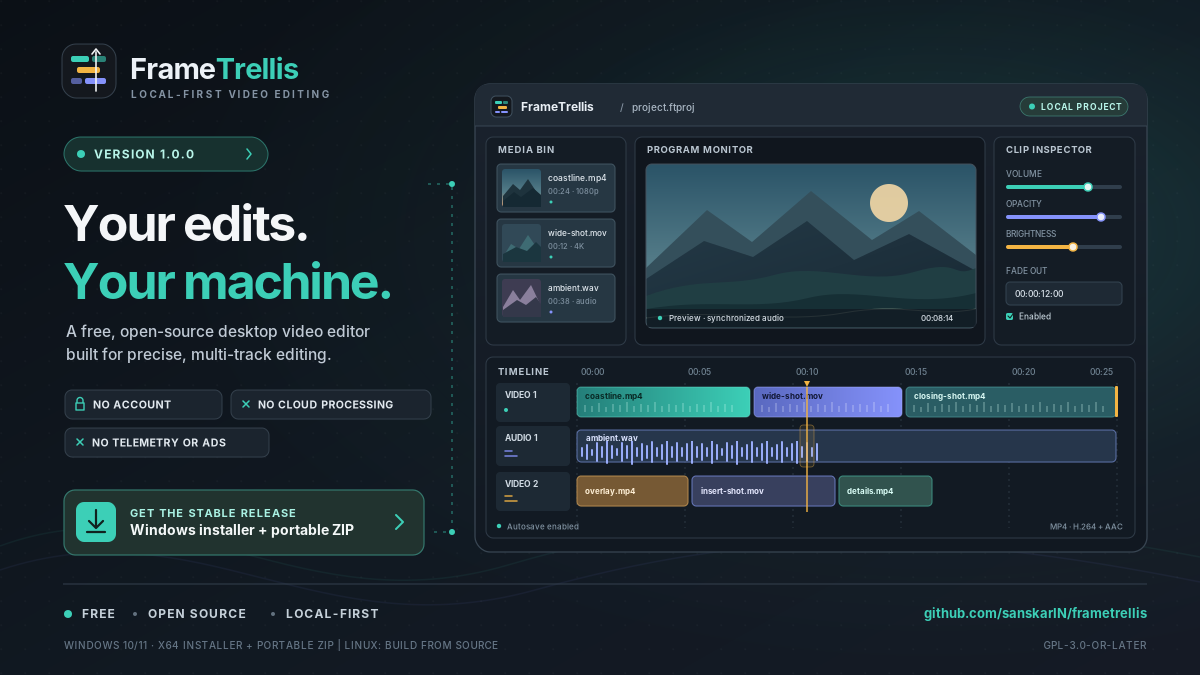
FrameTrellis v1.0.0 is here: an open-source, local-first video editor with multi-track editing, audio tools, MP4 export, and safe project recovery.
FrameTrellis v1.0.0 Is Here
A new milestone for local-first, open-source video editing.
FrameTrellis v1.0.0 is the first stable release of my desktop video editor, built with C++20, Qt 6/QML, MLT, and FFmpeg.
The goal is to provide practical multi-track editing tools while keeping your media and projects on your own computer.
No account is required. There is no cloud processing, telemetry, or advertising.
Edit, preview, and export
FrameTrellis includes a multi-track timeline for video and audio, clip trimming and splitting, snapping, real-time preview, audio waveforms, transitions, and clip-level picture and sound adjustments.
You can export projects to MP4 using H.264 video and AAC audio. Project files use a validated format, with atomic saving, undo/redo, automatic saving, crash recovery, and missing-media relinking.
Download FrameTrellis
The first stable release includes two Windows x64 options:
- Installer: Install FrameTrellis on Windows 10 (version 1809 or later) or Windows 11.
- Portable ZIP: Extract the archive and run the application.
Linux users can build the application from source. Linux packages and macOS support are not available in v1.0.0.
What comes next?
Titles, subtitles, keyframes, proxy media, additional export formats, and expanded platform support remain on the roadmap.
I'm continuing development with an emphasis on a dependable editing workflow, clear documentation, and feedback from people who use the software.
Get involved
Explore the source code · Read the documentation · Report a bug
FrameTrellis is free and open source under the GPL-3.0-or-later license.
Found a problem or have an idea for an improvement? Feedback, testing, documentation contributions, and code contributions are welcome.
FrameTrellis v1.0.0 is the first stable milestone, not the end of the journey.
— Sanskar